
For years, “accessible” digital services meant technical usability. If a website loaded properly, didn’t crash, or could be navigated with some effort, it was considered good to go.
That era is over. As of April 24, 2024, the Department of Justice published a final rule under Title II of the Americans with Disabilities Act that requires state and local governments to make their websites and mobile apps fully accessible to everyone. If those platforms fail to meet accessibility standards, it would be a civil rights violation and could lead to serious consequences.
This can be a turning point for the 57 million Americans living with a disability, older adults who rely on assistive technology to access city services, or anyone trying to use a government app one-handed on a bright afternoon.
Read on to understand the ADA Title II update, who must comply with digital accessibility rules, and why digital rights matter just as much as physical ones do.
Why This Rule Is A Game Changer For You
Local government websites are the infrastructure of daily civic life. People rely on them for transit schedules, permit applications, school registration, court dates, emergency alerts, property tax payments, and voter registration. And until now, a person who is blind, has low vision, uses a screen reader has had to find another way, ask someone for help, or simply go without.
That last option has never been a small thing. A person who can’t use the transit authority’s trip planner because it’s built on unlabeled drop-downs can’t go to work, make a medical appointment, or reach anywhere else. The digital barrier becomes a physical one.
Luckily, the DOJ has addressed that issue. If implemented properly, people with disabilities would be able to fully access and interact with all government websites, which means:
- Fewer workarounds
- Less dependence on others
- More confidence in navigating public services online
- Real-time updates that reach you like everyone else
- A smoother, more predictable experience across platforms
The Technical Standard: WCAG 2.1 Level AA
Developed by the World Wide Web Consortium, WCAG or Web Content Accessibility Guidelines serves as the global benchmark for digital accessibility, and WCAG 2.1 Level AA is the legal baseline for all government digital services in the United States.
Think of it the way you think about ADA physical standards. The law doesn’t just state “make the building accessible” but also specifies door widths, ramp grades, and turning radius clearances. WCAG 2.1 Level AA does the same for digital accessibility, so there’s no room to argue.
What “Level AA” Actually Means
WCAG 2.1 has three tiers: A (minimum), AA (standard), and AAA (enhanced). Level AA is the widely adopted professional standard that covers 50 specific success criteria across four core principles.
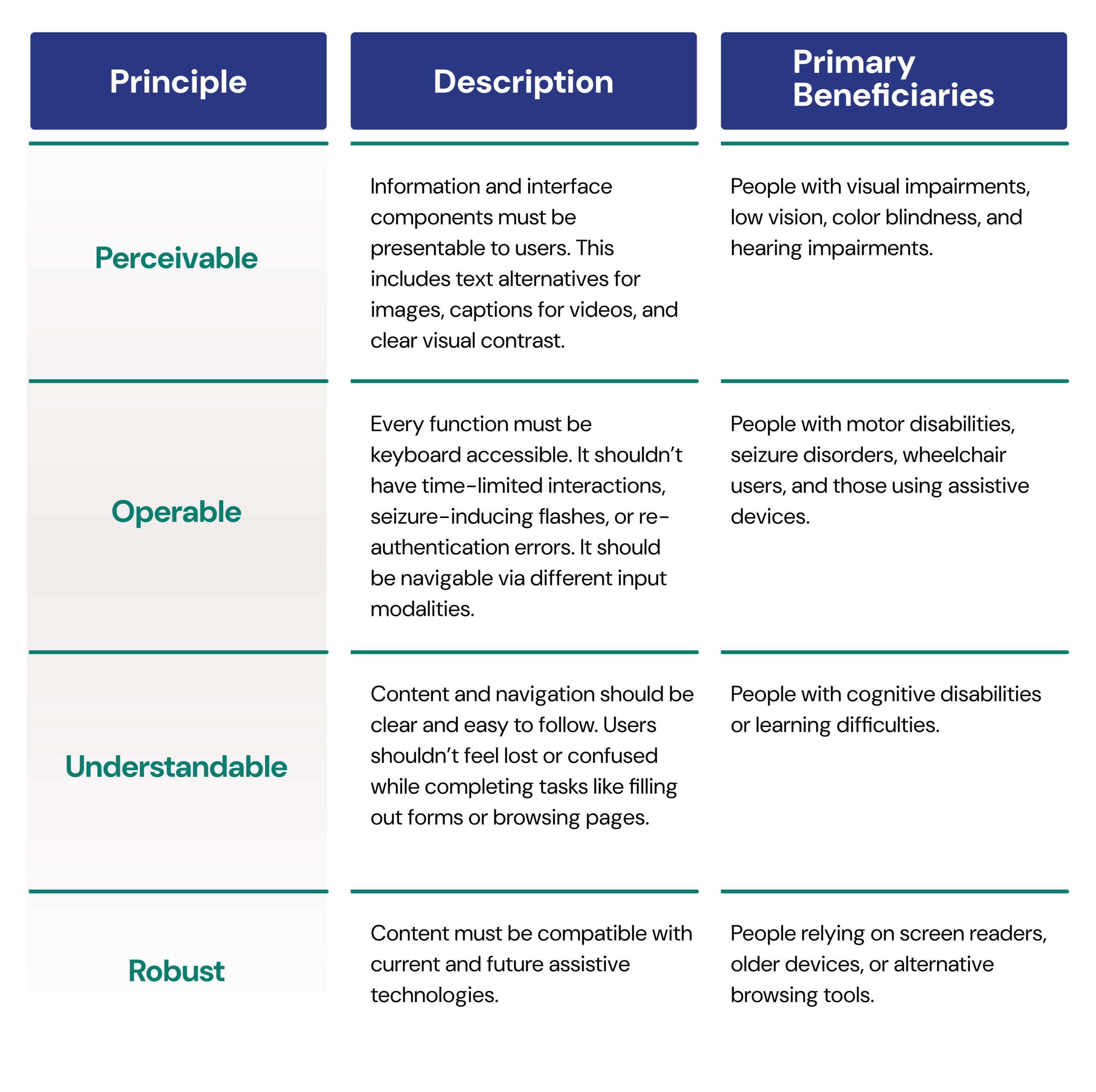
These technical criteria can enable you to pay a parking ticket, sign up for emergency alerts, or apply for housing assistance without hitting a wall every 30 seconds. However, the rule doesn’t apply to archived content that’s not actively used, preexisting conventional electronic documents, some third-party content without government authority, preexisting social media posts, and password-protected individualized documents.
Like what you’re reading? Subscribe to our newsletter and get new updates directly to your inbox.
Mobile Apps and The “On-The-Go” Experience
One of the most significant parts of the 2024 rule is that it explicitly includes mobile applications. The reason is that most people aren’t sitting at a desk when they need these services.
They’re:
- Checking transit times while already outside
- Paying for parking on the spot
- Accessing school or health updates in real time
- Using local government apps during travel
The mobile app accessibility applies to:
- Transit apps with real-time arrival info, route changes, and accessible vehicle tracking
- Parking apps for accessible spaces, payment, and time extensions without returning to a kiosk
- Parks and recreation apps for trail conditions, facility reservations, and accessibility maps
- Voting and civic participation apps for sample ballots, polling location information, and election updates
- Public health and emergency management apps for alerts, shelter locations, and resource access
- School and social services portals for families navigating government programs
The DOJ is clear that if a city contracts a private company to build or operate the app, the city remains responsible for its accessibility requirements. The government’s obligation doesn’t get transferred to a vendor.
What This Means If You Rent With Wheelchair Getaways
When you’re planning a beach getaway or a day road trip near major hubs, you have to verify accessibility claims, double-check facility details, and plan for backup options because “accessible” on a website can mean anything from a true roll-in shower to a bathroom with one grab bar and a prayer.
The updated Americans with Disabilities Act Title II rule makes that process a whole lot easier. With accessible government websites, you can now find:
- Which park trails have paved or compacted surfaces
- Whether a beach access ramp is operational or under repair
- What accessible restroom facilities exist at the destination and along the route
- How to reserve an accessible campsite or picnic area online without calling
- Real-time accessible transit options in an unfamiliar city
- Availability of accessible parking spaces and how to pay for them digitally
- Elevator access and outages in public transit systems or buildings
- Paratransit services, eligibility, and booking options
- Road closures, detours, or construction that may affect accessible routes
- Emergency alerts and evacuation information in accessible formats
If you don’t plan to use public transport, either because it’s limited or because you’re traveling to a remote destination, Wheelchair Getaways offers another option built around your needs from the start.
Our fleet includes wheelchair-accessible vans equipped with ramps or lifts, secure tie-down systems, and spacious interiors for a comfortable journey with friends and family members.
Beyond the vehicles themselves, we offer short-term and long-term rental options that fit your schedule, flexible pickup and drop-off arrangements, and discounts that make longer trips more practical.
Most importantly, our website is designed with accessibility in mind, so you can browse vehicle options, compare features, or fill out booking forms without getting stuck in confusing layouts or poorly labeled menus.
When Will These Changes Happen?
The rule covers all state and local government entities, including city websites, county portals, transit apps, library systems, regional parks departments, public hospitals, public school platforms, and anything else a government body operates or contracts out. However, the timeline is tied to population size, which is a practical acknowledgment because a rural county of 8,000 people doesn’t have the same IT budget as New York City.
Here’s the proposed implementation timelines:
- Large municipalities (50,000+ people): Cities, counties, and transit authorities serving more than 50,000 people must comply with WCAG 2.1 Level AA within two years. That’s April 24, 2026.
- Smaller municipalities: Small public entities and special district governments receive an additional year, totaling three years. They must reach full compliance by April 26, 2027.
What Should the Government Do Right Now?
If you work in a local government IT, communications, or policy department, don’t wait until months before the deadline. Accessibility remediation takes time, so follow these steps:
- Run an audit: Automated tools like Axe, WAVE, or Lighthouse quickly catch a meaningful percentage of WCAG violations. They won’t highlight everything, such as color contrast issues in PDFs, improperly labeled form fields in legacy systems, or missing captions on embedded video, but they give you a real picture of the gap.
- Request current VPAT: Ask every vendor and third-party provider for an up-to-date Voluntary Product Accessibility Template. If they can’t produce one, that’s your answer
- Stop creating inaccessible content: Whether you’re publishing a new permit form, writing a policy document, or rolling out a mobile app update, make sure every piece of it meets WCAG 2.1 Level AA criteria.
- Document everything: If you’re claiming archived content or pre-existing document exemptions, keep a clear record.
Resources For Further Reading
If you want a full technical breakdown of compliance requirements, definitions, and enforcement details, check out the following sources: